

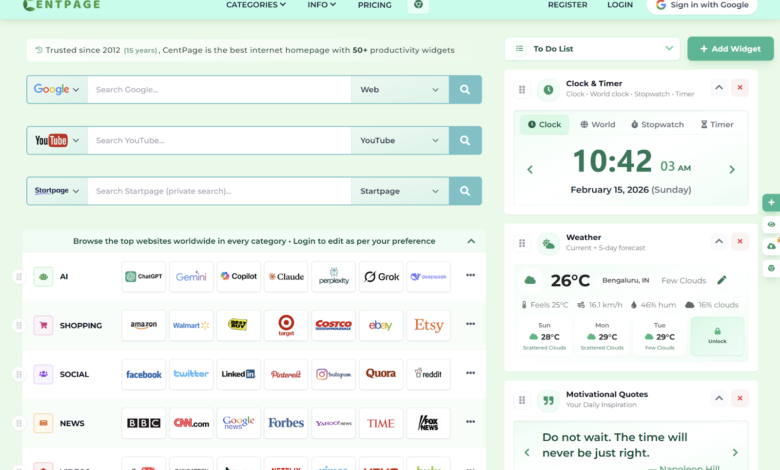
Imagine starting your day by opening your browser and being greeted by a cluttered mess of tabs, notifications, and random bookmarks. It feels overwhelming, right? Now imagine the opposite: a clean, personalized homepage that shows exactly what you need for work or study. It can set the tone for your entire session, boosting focus and productivity before you even start typing.
Platforms like the new tab extension make it easy to create such a homepage. With a few simple steps, you can turn your browser into a personal productivity command center, tailored to your goals, whether you’re finishing assignments, managing projects, or preparing for presentations.
Start With a Goal Oriented Layout.
The first step to a productive homepage is designing it around your daily goals. Ask yourself: What do I need most at this moment? Your layout should reflect your priorities:
Morning routine: Quick access to news feeds, weather, and calendars.
Work tasks: Shortcuts to email, project management apps, or research tools.
Study session: Notes, online libraries, or learning platforms.
By visually separating sections, you know exactly where to focus at any given time. A goal oriented layout reduces the mental load of deciding where to click next.
Use Visual Cues and Minimal Design.
Visual clutter is a hidden productivity killer. Even if all your tools are useful, a messy homepage can overwhelm your brain. Consider these ideas:
Minimalist backgrounds: Light colors or subtle patterns reduce eye strain.
Icons over text: Quickly identify apps or sections at a glance.
Color coding: Assign colors to different task types (e.g., green for work, blue for study).
With a visually calm and organized internet homepage, your mind stays clear and focused. Simple design choices can lead to measurable improvements in concentration.
Integrate Smart Tools.
To make your homepage truly functional, integrate tools tha save time and streamline tasks. Examples include:
Productivity extensions: Tools for task tracking, note taking, or timer apps.
Resource discovery: Use platforms like ProductHunt to find apps that suit your workflow.
Live updates: Embed social or professional feeds such as Twitter X to stay informed without opening extra tabs.
The idea is to create a homepage where everything you need is accessible without distraction, reducing the temptation to multitask unnecessarily.
Include Quick Access Sections.
Quick access sections are essential for maintaining flow:
Bookmark bar: Keep your most used sites at the top.
Favorite apps panel: Add web apps like Google Docs, Slack, or Zoom for instant access.
Notes or reminders: Small text boxes or widgets for jotting down quick ideas.
These sections allow you to jump straight into productive work, avoiding time wasted searching for links or apps.
Personalize and Refresh Regularly.
A homepage is not “set it and forget it.” To maintain productivity and focus:
Personalize content: Add motivational quotes, daily goals, or progress trackers.
Regular updates: Remove outdated links and incorporate new tools that fit your workflow.
Experiment with layouts: Small adjustments in placement or color can make a big difference in efficiency.
Regular personalization keeps your homepage aligned with your current priorities and ensures it continues to serve as a productivity booster.
Conclusion.
A well designed internet homepage is more than a browser starting page it’sthe foundation of productive work and focused study sessions By creating a goal oriented layout, minimizing visual clutter, integrating smart tools, and personalizing your space, you can transform your browser into a powerful productivity hub.
Tools like the CentPage website, along with carefully selected extensions, discovery platforms, and curated feeds, make this setup easy and effective. Spending a few minutes designing your homepage can save hours each week, keeping you focused, organized, and motivated.
Watch the official CentPage promo video
https://www.youtube.com/watch?v=7Jzyk9Pm0sk